City of Bristol College participates in eduroam, providing secure Wi-Fi access for eligible staff and students and enabling members of participating education and research organisations to connect when visiting other eduroam-enabled locations. With eduroam, you can use your organisation’s credentials to connect to the internet at participating colleges, universities and research organisations around the UK and around the world.
If you are a City of Bristol College student or member of staff, you can use your College credentials to connect to eduroam at participating locations.
For the easiest setup, use the geteduroam app where supported.
Set up eduroam
1. Download and install geteduroam on your device.
2. Search for and select City of Bristol College.
3. Follow the instructions provided by the app.
4. Sign in using your College network credentials when prompted.
5. Once your device has been configured, select eduroam from the available Wi-Fi networks.
Important: Only enter your College credentials when following the official eduroam setup instructions. Correct device configuration helps ensure that you are connecting to a genuine eduroam service.
Your eduroam username
Your eduroam username
Enter your City of Bristol College email address in full e.g. …@cityofbristol.ac.uk
Keep your credentials secure
Your College username and password are personal to you.
Never share your College credentials with anyone else.
Do not allow another person to use your eduroam credentials.
If you believe your credentials have been compromised, contact the College IT Helpdesk immediately.
Follow the College’s acceptable use and IT policies when using eduroam.
When you leave City of Bristol College, you must remove the eduroam profile from any devices you have used to connect to the service.
Where can I use eduroam?
You can use eduroam at participating colleges, universities and research organisations in the UK and around the world.
When visiting another organisation, you should follow that organisation’s local network policies and instructions.
If you are visiting City of Bristol College and your home organisation participates in eduroam, you may be able to connect to eduroam using the credentials supplied by your home organisation.
You should configure your device with your home organisation’s official eduroam setup instructions before visiting wherever possible.
If you experience problems connecting at the College, please contact your home organisation’s IT support team in the first instance. Your home organisation is responsible for supporting your eduroam credentials.
For problems that appear to relate specifically to the College’s Wi-Fi service, please contact the College IT Helpdesk.
Users must comply with the policies of both their home organisation and the organisation providing the eduroam service. Where requirements differ, the more restrictive requirement applies.
About eduroam
eduroam is a secure, international roaming Wi-Fi service for the education and research community.
It allows users from participating organisations to connect to Wi-Fi using their home organisation’s credentials without needing to create a separate guest account at every organisation they visit.
About eduroam
About eduroam
eduroam is a secure, international roaming Wi-Fi service for the education and research community.
It allows users from participating organisations to connect to Wi-Fi using their home organisation’s credentials without needing to create a separate guest account at every organisation they visit.
Important information
Important information
When your association with City of Bristol College ends, you must remove the eduroam profile from all devices you have used to connect to the service.
If you believe your College credentials have been compromised, contact the College IT Helpdesk immediately.
Alternative ways to get online at the college
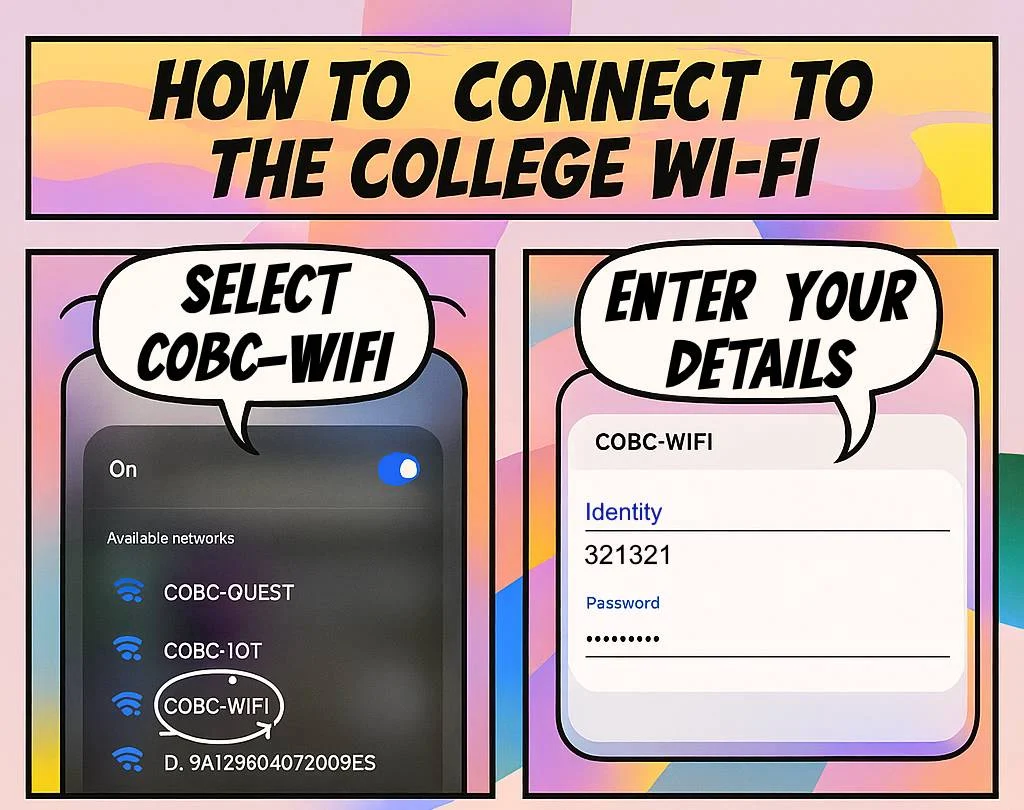
To connect to the College Wi-Fi, look for COBC-WIFI. You will be asked to sign in with your College network credentials.